
Collection: Understanding PBe File Type
Important to understand each file type daily generated by PBe’s system. 2 Major types of files will be generated which is system type file & human readable report file.
File Format & File Types
PBe Direct Debit File Format

– PBB: Bank Code
– XXX: Merchant Code
– 310117: Date format (DDMMYY)
– 01: File Index
– ZZZ: File Type
PBe Direct Debit File Types
- DOF: Direct Debit Feedback System File
- DEF: Direct Debit Enrollment System File
- DER: Direct Debit Enrollment Report File
- DFR: Direct Debit Fees Report File
- DRR: Direct Debit Rejected Transactions Report File
- DSR: Direct Debit Successful Transactions Report File
Understanding Processes
PBe system generate one file set daily (6 files) no matter user with/without perform any transactions. In order to identify required file set, user recommend to:
1) Understand file format, locate necessary file using date
2) Understand Empty File Set, File Set with Content
– DOF & DEF file size larger than 0Bytes
– DER > 1080Bytes, DFR > 2680Bytes, DRR > 5896Bytes, DSR > 1206Bytes
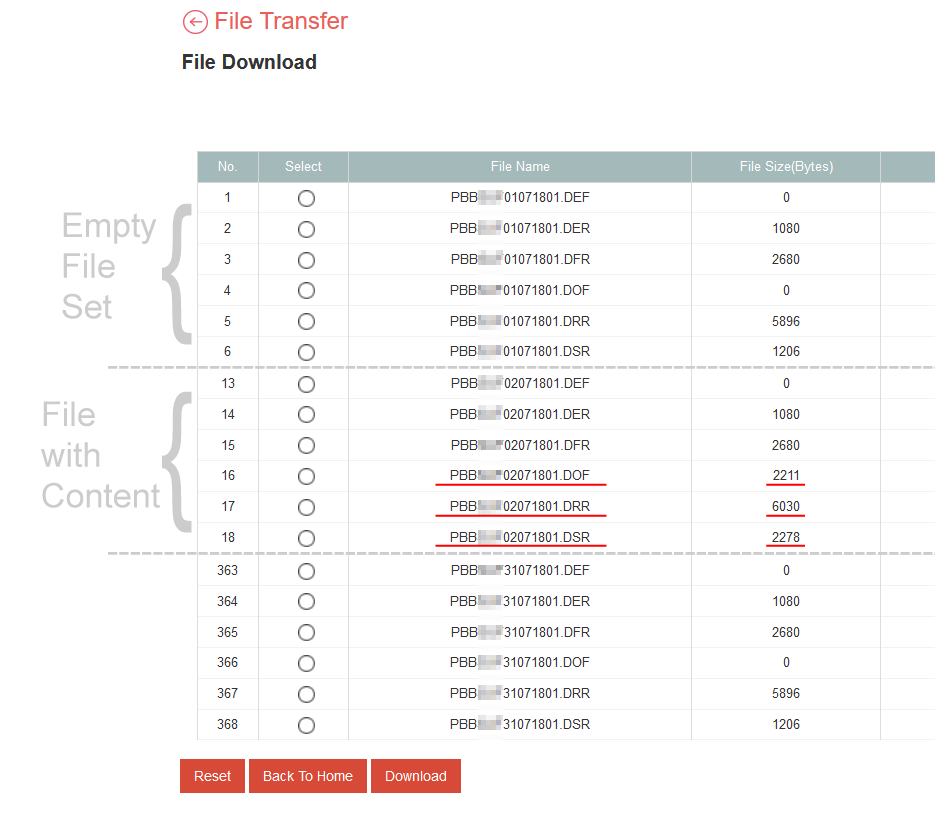
PBe File in SalesHub
1) DOF (DD Feedback file) : Required for each Collection batch to update every transaction status. [Read More]
2) DEF (DD Enrollment file): Get Customer Enrollment Status & details including rejected reason if application rejected. [Read More]